Posts

Fail to start Apache due to port occupied

At error log, make_sock: could not bind to address 0.0.0.0:443 or 80 The problem is with the port conflict Verify with lsof command: #lsof -i :80 Sample output bash 19089 root 18u IPv4 127053 TCP *:http (LISTEN) Kill conflict process #kill -9 19089 Check again #lsof -i :80 Start Apache #apachectl start
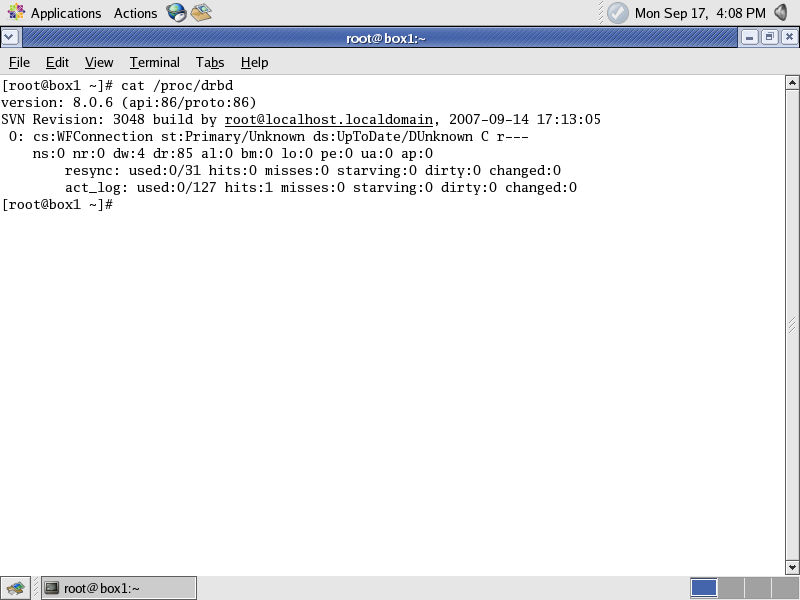
DRBD setup

In this lab, we try to achieve network disk mirroring with DRBD software Version – drbd-8.0.6 OS – CentOS 4.5 Build drbd RPMs from source tarball cd /usr/src tar zxvf drbd-8.0.6.tar.gz cd drbd-8.0.6 make rpm RPM installation cd dist/RPMS/i386/ rpm -ivh drbd-8.0.6-3.i386.rpm rpm -ivh drbd-debuginfo-8.0.6-3.i386.rpm rpm -ivh drbd-km-2.6.9_55.EL-8.0.6-3.i386.rpm Edit /etc/drbd.conf resource "share1" { protocol C; startup { wfc-timeout 0; ## Infinite! degr-wfc-timeout 60; ## 2 minutes. } disk { on-io-error detach; } net { } syncer { } on box1.lan { device /dev/drbd0; disk /dev/sdd1; address 192.168.91.2:7789; meta-disk /dev/sdf1[0]; #meta-disk internal; } on box2.lan { device /dev/drbd0; disk /dev/sdd1; address 192.168.91.3:7789; meta-disk /dev/sdf1[0]; #meta-disk internal; } } resource "share2" { protocol C; startup { wfc-timeout 0; ## Infinite! degr-wfc-timeout 60; ## 2 minutes. } disk { on-io-error detach; } net { } syncer { } on box1...

Active Passive setup with heartbeat drbd and Apache

Image
Heartbeat 2 + DRBD 8 + Apache Step 1 : Configure DRBD -> Follow DRBD configuration steps Step 2 : Give Virtual IP for HeartBeat ###At both machines ifconfig eth0:1 192.168.91.95 netmask 255.255.255.0 (put at /etc/rc.d/rc.local) Step 3 : Configure Apache Edit /etc/httpd/conf/httpd.conf Machine – 192.168.91.2 <VirtualHost 192.168.91.95> DocumentRoot /web <-- DRBD <Directory "/web"> allow from all Options +Indexes </Directory> ServerName 192.168.91.2 </VirtualHost> Machine – 192.168.91.3 <VirtualHost 192.168.91.95> DocumentRoot /web <-- DRBD <Directory "/web"> allow from all Options +Indexes </Directory> ServerName 192.168.91.3 </VirtualHost> Step 4: Installation and Configuration Heatbeat ###At Both machine rpm -ivh lm_sensors-2.8.7-2.40.3.i386.rpm rpm -ivh heartbeat-pils-2.0.8-2.el4.centos.i386.rpm rpm -ivh heartbeat-stonith-2.0.8-2.el4.centos.i...

MYSQL auth with apache .htaccess

MySQL authentication provides a more flexible and powerful system than Basic or Digest authentication. All the username's and passwords can be in database which provides capability to standardize among all web servers. Module: mod_auth_mysql Configure following parameters at .htaccess file AuthType: This need to be Basic. AuthName: This is the name (realm) you want to give to your password protected site. Auth_MYSQLhost: Your MySQL database hostname. Auth_MYSQLusername: Your MySQL database username. Auth_MYSQLpassword: Your MySQL database password. Auth_MYSQLdatabase: This is your database with the member's info. Auth_MYSQLpwd_table: The members info table containing (Apache username/password). Auth_MYSQLuid_field: The username field. Auth_MYSQLpwd_field: The password field. Auth_MYSQL_EncryptedPasswords: Are the password MySQL encrypt. [onoff]. require valid-user Ref: https://www.widexl.com/tutorials/htaccess.html

Increase JVM memory in Linux

You can increase the JVM memory for better performance if your system has sizeable free memory export JAVA_OPTS="-Xms 128m -Xmx 128m -server -Djava.net.preferIPv4Stack=true" You can make it permanent by configuring at .bashrc or .profile Activate with source ~/.bashrc source ~/.profile

Confluence Installation

Confluence is a collaboration software written in Java. Install prerequisite packages  rpm -ivh pcre-devel-4.5-3.i386.rpm rpm -ivh apr-devel-0.9.4-24.1.i386.rpm rpm -ivh apr-util-devel-0.9.4-17.i386.rpm rpm -ivh httpd-devel-2.0.52-9.ent.i386.rpm Uninstall GNU java rpm -e java-1.4.2-gcj-compat rpm -e gcc-java Install jdk =========== chmod +x jdk-1_5_0_08-linux-i586-rpm.bin ./jdk-1_5_0_08-linux-i586-rpm.bin cd /usr/java/jdk1.5.0_08 ln -s /usr/java/jdk1.5.0_08 /usr/java/jdk Install Tomcat ============== #create Tomcat Account groupadd tomcat useradd -g tomcat tomcat cd /usr/local tar xzf apache-tomcat-5.5.17.tar.gz ln -s apache-tomcat-5.5.17 tomcat5 #change ownership cd /usr/local chown -R tomcat.root /usr/local/tomcat5 chown -R tomcat.root /usr/local/apache-tomcat-5.5.17 Set environment variable =============== vi /etc/profile export JAVA_HOME=/usr/java/jdk export CATALINA_HOME=/usr/local/tomcat5 export PATH=$PATH:/usr/java/jdk/bin logout St...

Increase PHP upload file size

Come across to increase PHP upload file size is very common in Linux, Apache, MySQL, and PHP (LAMP) environment. Edit /etc/php.ini 1. max_execution_time = 30 -> 300 2. memory_limit = 8M -> 16MB 3. post_max_size = double of upload size e.g upload size 10 MB -> post_max_size 20 MB 4. upload_max_filesize = 10M Edit /etc/httpd/conf.d/php.conf Change LimitRequestBody